The AI Browser Wars: What Comet, Atlas, and Dia Reveal About Designing for AI-First Experiences

Last week, I watched OpenAI’s Sam Altman announce Atlas with the kind of confidence usually reserved for iPhone launches. “Tabs were great,” he said, “but we haven’t seen a lot of innovation since then.” Meanwhile, Perplexity had just made its Comet browser free to everyone after three months of charging $200/month for access. And The Browser Company’s Dia, which launched in beta back in June, recently opened to the public with a $20 subscription tier.
Three AI-powered browsers, three radically different product philosophies, all launching within months of each other. If you’re a product designer or builder right now, this moment is gold. Because buried in these competing visions isn’t just a browser war — it’s a masterclass in how to design for AI-native experiences.
The Setup: Why Now?
The traditional browser hasn’t fundamentally changed in nearly two decades. Sure, Chrome got faster and Safari got sleeker, but the core interaction model remained the same: type a URL, click a link, open a tab, repeat. We’ve been living in a world where the browser is a passive window to the web.
AI is changing that equation entirely. Instead of searching and clicking our way through information, we’re starting to ask, delegate, and trust our tools to act on our behalf. The question isn’t whether AI belongs in browsers — it’s how it should be integrated without breaking what already works.
Enter three very different answers.
Comet: The Search Engine That Became a Browser
Perplexity’s origin story matters here. They started as an AI-powered search engine, building trust around accurate, sourced answers. Comet feels like the natural extension of that philosophy — a browser built around the idea that curiosity should flow seamlessly.
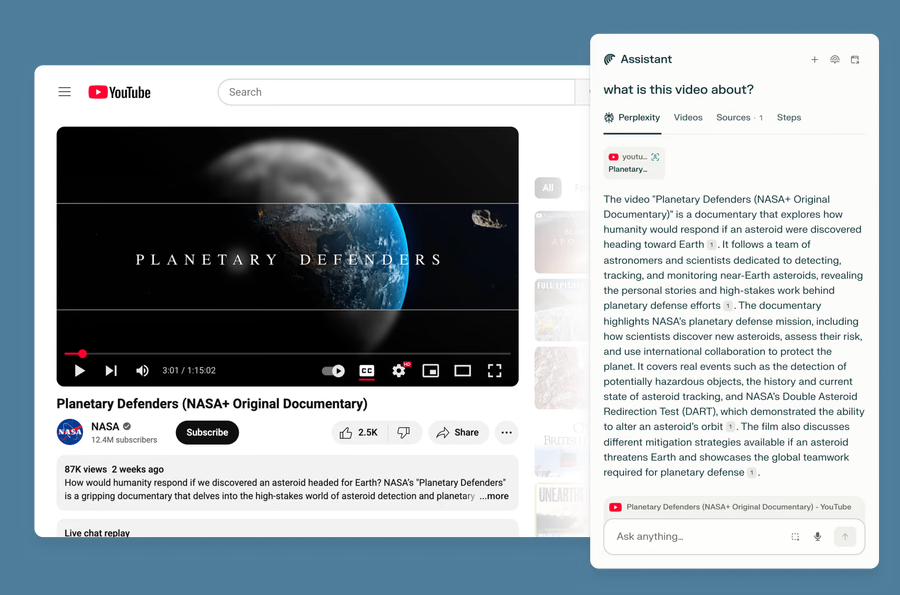
The core design decision? Put AI search at the center, and make the sidecar assistant always available. When you open a new tab in Comet, you’re greeted with Perplexity’s search interface, not Google’s. The assistant follows you across every page, ready to answer questions about what you’re looking at without you needing to copy-paste or switch contexts.
Design Insight: Comet succeeds by making AI feel like a natural extension of browsing, not an interruption. The sidecar model is brilliant because it respects the user’s primary task (reading, researching, shopping) while offering help exactly when context is fresh. But there’s a trade-off — Comet’s background assistant, which can handle multiple tasks simultaneously while you work, requires extensive permissions and introduces real security concerns.
What Comet gets right is progressive disclosure. Free users get the sidecar. Paid users ($200/month initially, now free with Pro at $20/month) get the background assistant that can juggle multiple tasks — booking flights, adding items to carts, drafting emails — all in a central “mission control” dashboard. The product grows with user trust.
Atlas: ChatGPT as Infrastructure
OpenAI took a different bet. Atlas isn’t trying to reinvent the browser — it’s trying to make ChatGPT the operating system layer for how you use one. Built on Chromium like most modern browsers, Atlas feels familiar at first glance. But the difference is immediately clear: ChatGPT isn’t a feature bolted on; it’s the interface itself.
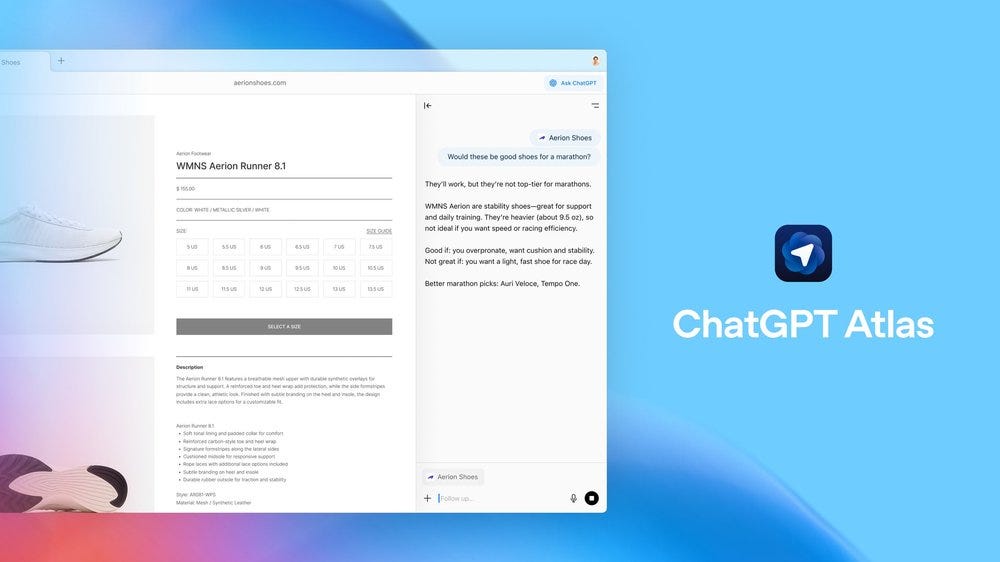
The home page is ChatGPT’s prompt box. The sidebar is always one click away. The “agent mode” can take control of your browser, clicking buttons and filling forms with a blue-highlighted cursor while you watch (or walk away to make that sandwich, as their demo suggested).
Design Insight: Atlas is making a larger philosophical statement — that the future of computing isn’t about better search, it’s about conversation as an interface. The key product decision here is making ChatGPT’s memory and context awareness central. Atlas remembers what sites you’ve visited, what you were working on, and uses that history to personalize responses. Ask “What was that doc I had my presentation plan in?” and it finds it.
But here’s where things get controversial. The MIT Technology Review called Atlas “cynicism masquerading as software,” arguing that it’s designed more for OpenAI to collect browsing data than to genuinely serve users. Early critics note that typing “Taylor Swift” into the search bar returns zero links to her actual website — just AI-generated summaries. Atlas may be powerful, but it’s also aggressively pushing users away from the open web toward a mediated AI layer.
The design lesson? Beware of building for your own platform needs before user needs. Atlas has 800 million weekly ChatGPT users it can funnel into a browser, which is a massive distribution advantage. But distribution without genuine value is just growth hacking.
Dia: Rethinking the Fundamentals
The Browser Company’s approach is the most radical of the three. After building Arc — a beloved browser among design nerds that never hit mainstream scale — they decided to start over. Dia isn’t about bolting AI onto existing browser patterns. It’s about redesigning the browser itself around agentic AI.
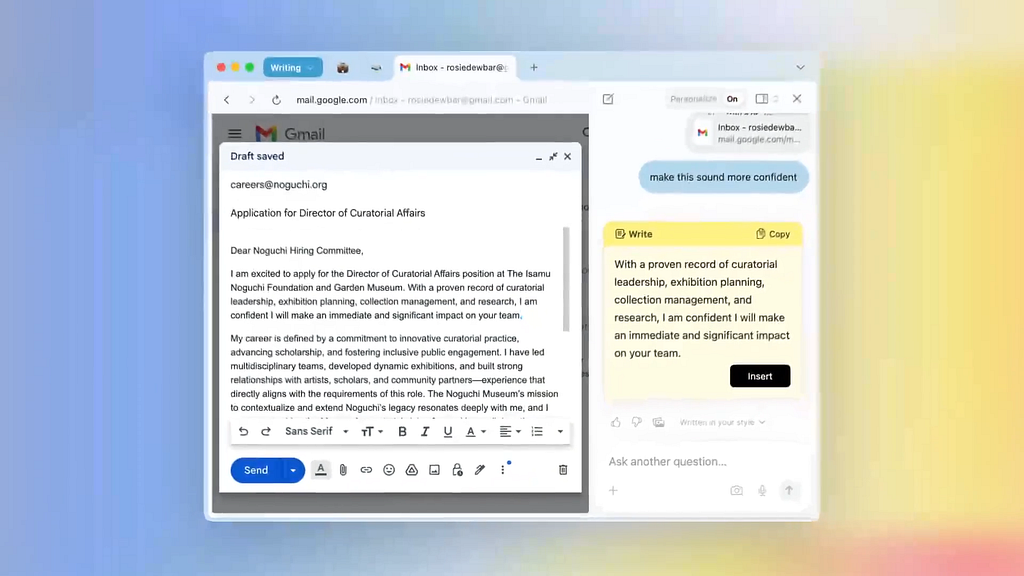
CEO Josh Miller demonstrated features that feel genuinely new: a cursor that can help you write your next sentence or fetch facts from the web; an address bar that accepts natural language commands like “find that doc and email it to Sarah”; an autonomous agent that can structure data from Notion and send personalized emails to each person listed.
Design Insight: Dia is asking the most interesting question — what happens when AI isn’t a sidebar or a search replacement, but a fundamental rethinking of input methods? The insertion cursor, the mouse, the address bar — these are the primitives of computing. Dia is making them intelligent.
The risk is complexity. Arc failed to scale because it was too different, too hard to learn. Dia needs to be both innovative and intuitive, which is the hardest design challenge in software. Early adopters love it ($20/month Pro tier for unlimited AI access), but we don’t know yet if it can reach the mass market Josh Miller is targeting.
The company is also being unusually transparent about the journey. They know Dia has to work seamlessly, generate revenue, and compete against incumbents simultaneously. That’s a product trifecta most startups never solve.
What Product Designers Can Learn
After spending time with all three browsers, a few patterns emerge:
1. Context is the new currency. All three browsers understand that AI without context is just another chatbot tab. The winner will be whoever can use the browsing context most intelligently without being creepy.
2. Trust happens in layers. Comet’s progression from paid sidecar to free universal access with premium background assistants shows smart product sequencing. Start with low-permission, high-value features. Earn trust. Then ask for more.
3. The interface is the AI strategy. Atlas makes ChatGPT the interface. Comet makes search the interface. Dia makes intelligence ambient across multiple input methods. There’s no “right” answer, but there are consequences to each choice.
4. Privacy will decide winners. Every person I talked to about these browsers eventually asked the same question: “But what about my data?” Atlas’s browser memory, Comet’s background assistant permissions, and Dia’s history awareness are all deeply personal surfaces. The company that cracks privacy-preserving AI browsing will have a massive advantage.
5. Distribution still matters, but differentiation matters more. OpenAI has 800 million weekly users. Google has 3 billion Chrome users. But neither has figured out how to make AI feel native to browsing yet. The Browser Company has no distribution advantage, but Dia feels genuinely different. That might be enough.
The Bigger Picture
Here’s what makes this moment fascinating: we’re watching three different mental models of AI-powered computing play out in real time.
Perplexity thinks the future is conversational search that eliminates the need for traditional web navigation. OpenAI thinks the future is ChatGPT as a universal interface layer for everything. The Browser Company thinks the future is making our existing tools — cursors, address bars, mice — intelligent enough that AI disappears into the workflow.
They can’t all be right. But they’re probably all pointing at pieces of what comes next.
For product designers, the lesson isn’t to copy any of these approaches wholesale. It’s to understand the trade-offs each one is making — and why. Every “innovative” AI feature comes with downstream implications for privacy, trust, complexity, and user agency. The products that win won’t just be the ones with the cleverest AI. They’ll be the ones that respect the relationship between human intention and machine capability.
As I write this, Chrome still has over 60% market share. Safari sits comfortably in second place. These AI-first browsers are barely a blip. But remember — Chrome launched in 2008 when Internet Explorer dominated. Slack launched in 2013 when email ruled workplace communication. Figma launched in 2015 when Sketch and Adobe owned design tools.
Sometimes the future sneaks up slowly, then all at once.
The AI browser wars are just beginning. But for product designers paying attention, the real battle isn’t about who builds the best browser. It’s about who figures out how to design for a world where intelligence, context, and automation become as fundamental to computing as the mouse and keyboard once were.
References:
- TechCrunch. (2025). “Perplexity launches Comet, an AI-powered web browser.” July 9, 2025. https://techcrunch.com/2025/07/09/perplexity-launches-comet-an-ai-powered-web-browser/
- Axios. (2025). “OpenAI launches new web browser, Atlas.” October 21, 2025. https://www.axios.com/2025/10/21/openai-atlas-new-ai-web-browser-release-date
- TechCrunch. (2025). “The Browser Company launches its AI-first browser, Dia, in beta.” June 11, 2025. https://techcrunch.com/2025/06/11/the-browser-company-launches-its-ai-first-browser-dia-in-beta/
- MIT Technology Review. (2025). “OpenAI’s new Atlas browser but I still don’t know what it’s for.” October 27, 2025. https://www.technologyreview.com/2025/10/27/1126673/openai-new-atlas-browser/
- Fortune. (2025). “Browser wars, a hallmark of the late 1990s tech world, are back with a vengeance — and OpenAI just entered the race.” October 22, 2025. https://fortune.com/2025/10/22/ai-browser-wars-agents-google-perplexity-opera-comet-neon-gemini/
- CNBC. (2025). “Perplexity AI rolls out Comet browser for free worldwide.” October 2, 2025. https://www.cnbc.com/2025/10/02/perplexity-ai-comet-browser-free-.html
- OpenAI. (2025). “Introducing ChatGPT Atlas.” October 21, 2025. https://openai.com/index/introducing-chatgpt-atlas/
- MacRumors. (2025). “AI Browser Dia Launches Publicly on Mac.” October 9, 2025. https://www.macrumors.com/2025/10/09/ai-browser-dia-launches-publicly-on-mac/
The AI Browser Wars: What Comet, Atlas, and Dia Reveal About Designing for AI-First Experiences was originally published in UX Planet on Medium, where people are continuing the conversation by highlighting and responding to this story.
المصدر: المصدر الأصلي
{“@context”:”https://schema.org”,”@type”:”NewsArticle”,”headline”:”The AI Browser Wars: What Comet, Atlas, and Dia Reveal About Designing for AI-First Experiences”,”description”:”
Last week, I watched OpenAI’s Sam Altman announce Atlas with the kind of confidence usually reserved for iPhone launches. “Tabs were great,” he said, “but we haven’t seen a lot of innovation since then.” Meanwhile, Perplexity had just made its Comet browser free to everyone after three months of charging $200/month for access. And The Browser Company’s Dia, which launched in beta back in June, recently opened to the public with a $20 subscription tier.
Three AI-powered browsers, three radically different product philosophies, all launching within months of each other. If you’re a product designer or builder right now, this moment is gold. Because buried in these competing visions isn’t just a browser war — it’s a masterclass in how to design for AI-native experiences.
The Setup: Why Now?
The traditional browser hasn’t fundamentally changed in nearly two decades. Sure, Chrome got faster and Safari got sleeker, but the core interaction model remained the same: type a URL, click a link, open a tab, repeat. We’ve been living in a world where the browser is a passive window to the web.
AI is changing that equation entirely. Instead of searching and clicking our way through information, we’re starting to ask, delegate, and trust our tools to act on our behalf. The question isn’t whether AI belongs in browsers — it’s how it should be integrated without breaking what already works.
Enter three very different answers.
Comet: The Search Engine That Became a Browser
Perplexity’s origin story matters here. They started as an AI-powered search engine, building trust around accurate, sourced answers. Comet feels like the natural extension of that philosophy — a browser built around the idea that curiosity should flow seamlessly.
The core design decision? Put AI search at the center, and make the sidecar assistant always available. When you open a new tab in Comet, you’re greeted with Perplexity’s search interface, not Google’s. The assistant follows you across every page, ready to answer questions about what you’re looking at without you needing to copy-paste or switch contexts.
Design Insight: Comet succeeds by making AI feel like a natural extension of browsing, not an interruption. The sidecar model is brilliant because it respects the user’s primary task (reading, researching, shopping) while offering help exactly when context is fresh. But there’s a trade-off — Comet’s background assistant, which can handle multiple tasks simultaneously while you work, requires extensive permissions and introduces real security concerns.
What Comet gets right is progressive disclosure. Free users get the sidecar. Paid users ($200/month initially, now free with Pro at $20/month) get the background assistant that can juggle multiple tasks — booking flights, adding items to carts, drafting emails — all in a central “mission control” dashboard. The product grows with user trust.
Atlas: ChatGPT as Infrastructure
OpenAI took a different bet. Atlas isn’t trying to reinvent the browser — it’s trying to make ChatGPT the operating system layer for how you use one. Built on Chromium like most modern browsers, Atlas feels familiar at first glance. But the difference is immediately clear: ChatGPT isn’t a feature bolted on; it’s the interface itself.
The home page is ChatGPT’s prompt box. The sidebar is always one click away. The “agent mode” can take control of your browser, clicking buttons and filling forms with a blue-highlighted cursor while you watch (or walk away to make that sandwich, as their demo suggested).
Design Insight: Atlas is making a larger philosophical statement — that the future of computing isn’t about better search, it’s about conversation as an interface. The key product decision here is making ChatGPT’s memory and context awareness central. Atlas remembers what sites you’ve visited, what you were working on, and uses that history to personalize responses. Ask “What was that doc I had my presentation plan in?” and it finds it.
But here’s where things get controversial. The MIT Technology Review called Atlas “cynicism masquerading as software,” arguing that it’s designed more for OpenAI to collect browsing data than to genuinely serve users. Early critics note that typing “Taylor Swift” into the search bar returns zero links to her actual website — just AI-generated summaries. Atlas may be powerful, but it’s also aggressively pushing users away from the open web toward a mediated AI layer.
The design lesson? Beware of building for your own platform needs before user needs. Atlas has 800 million weekly ChatGPT users it can funnel into a browser, which is a massive distribution advantage. But distribution without genuine value is just growth hacking.
Dia: Rethinking the Fundamentals
The Browser Company’s approach is the most radical of the three. After building Arc — a beloved browser among design nerds that never hit mainstream scale — they decided to start over. Dia isn’t about bolting AI onto existing browser patterns. It’s about redesigning the browser itself around agentic AI.
CEO Josh Miller demonstrated features that feel genuinely new: a cursor that can help you write your next sentence or fetch facts from the web; an address bar that accepts natural language commands like “find that doc and email it to Sarah”; an autonomous agent that can structure data from Notion and send personalized emails to each person listed.
Design Insight: Dia is asking the most interesting question — what happens when AI isn’t a sidebar or a search replacement, but a fundamental rethinking of input methods? The insertion cursor, the mouse, the address bar — these are the primitives of computing. Dia is making them intelligent.
The risk is complexity. Arc failed to scale because it was too different, too hard to learn. Dia needs to be both innovative and intuitive, which is the hardest design challenge in software. Early adopters love it ($20/month Pro tier for unlimited AI access), but we don’t know yet if it can reach the mass market Josh Miller is targeting.
The company is also being unusually transparent about the journey. They know Dia has to work seamlessly, generate revenue, and compete against incumbents simultaneously. That’s a product trifecta most startups never solve.
What Product Designers Can Learn
After spending time with all three browsers, a few patterns emerge:
1. Context is the new currency. All three browsers understand that AI without context is just another chatbot tab. The winner will be whoever can use the browsing context most intelligently without being creepy.
2. Trust happens in layers. Comet’s progression from paid sidecar to free universal access with premium background assistants shows smart product sequencing. Start with low-permission, high-value features. Earn trust. Then ask for more.
3. The interface is the AI strategy. Atlas makes ChatGPT the interface. Comet makes search the interface. Dia makes intelligence ambient across multiple input methods. There’s no “right” answer, but there are consequences to each choice.
4. Privacy will decide winners. Every person I talked to about these browsers eventually asked the same question: “But what about my data?” Atlas’s browser memory, Comet’s background assistant permissions, and Dia’s history awareness are all deeply personal surfaces. The company that cracks privacy-preserving AI browsing will have a massive advantage.
5. Distribution still matters, but differentiation matters more. OpenAI has 800 million weekly users. Google has 3 billion Chrome users. But neither has figured out how to make AI feel native to browsing yet. The Browser Company has no distribution advantage, but Dia feels genuinely different. That might be enough.
The Bigger Picture
Here’s what makes this moment fascinating: we’re watching three different mental models of AI-powered computing play out in real time.
Perplexity thinks the future is conversational search that eliminates the need for traditional web navigation. OpenAI thinks the future is ChatGPT as a universal interface layer for everything. The Browser Company thinks the future is making our existing tools — cursors, address bars, mice — intelligent enough that AI disappears into the workflow.
They can’t all be right. But they’re probably all pointing at pieces of what comes next.
For product designers, the lesson isn’t to copy any of these approaches wholesale. It’s to understand the trade-offs each one is making — and why. Every “innovative” AI feature comes with downstream implications for privacy, trust, complexity, and user agency. The products that win won’t just be the ones with the cleverest AI. They’ll be the ones that respect the relationship between human intention and machine capability.
As I write this, Chrome still has over 60% market share. Safari sits comfortably in second place. These AI-first browsers are barely a blip. But remember — Chrome launched in 2008 when Internet Explorer dominated. Slack launched in 2013 when email ruled workplace communication. Figma launched in 2015 when Sketch and Adobe owned design tools.
Sometimes the future sneaks up slowly, then all at once.
The AI browser wars are just beginning. But for product designers paying attention, the real battle isn’t about who builds the best browser. It’s about who figures out how to design for a world where intelligence, context, and automation become as fundamental to computing as the mouse and keyboard once were.
References:
- TechCrunch. (2025). “Perplexity launches Comet, an AI-powered web browser.” July 9, 2025. https://techcrunch.com/2025/07/09/perplexity-launches-comet-an-ai-powered-web-browser/
- Axios. (2025). “OpenAI launches new web browser, Atlas.” October 21, 2025. https://www.axios.com/2025/10/21/openai-atlas-new-ai-web-browser-release-date
- TechCrunch. (2025). “The Browser Company launches its AI-first browser, Dia, in beta.” June 11, 2025. https://techcrunch.com/2025/06/11/the-browser-company-launches-its-ai-first-browser-dia-in-beta/
- MIT Technology Review. (2025). “OpenAI’s new Atlas browser but I still don’t know what it’s for.” October 27, 2025. https://www.technologyreview.com/2025/10/27/1126673/openai-new-atlas-browser/
- Fortune. (2025). “Browser wars, a hallmark of the late 1990s tech world, are back with a vengeance — and OpenAI just entered the race.” October 22, 2025. https://fortune.com/2025/10/22/ai-browser-wars-agents-google-perplexity-opera-comet-neon-gemini/
- CNBC. (2025). “Perplexity AI rolls out Comet browser for free worldwide.” October 2, 2025. https://www.cnbc.com/2025/10/02/perplexity-ai-comet-browser-free-.html
- OpenAI. (2025). “Introducing ChatGPT Atlas.” October 21, 2025. https://openai.com/index/introducing-chatgpt-atlas/
- MacRumors. (2025). “AI Browser Dia Launches Publicly on Mac.” October 9, 2025. https://www.macrumors.com/2025/10/09/ai-browser-dia-launches-publicly-on-mac/
The AI Browser Wars: What Comet, Atlas, and Dia Reveal About Designing for AI-First Experiences was originally published in UX Planet on Medium, where people are continuing the conversation by highlighting and responding to this story.
“,”datePublished”:”2025-10-30 15:38:10″,”author”:{“@type”:”Organization”,”name”:”العربية”},”publisher”:{“@type”:”Organization”,”name”:”Newsly”,”url”:”http://wordpress-hr2d6.wasmer.app”},”image”:”https://cdn-images-1.medium.com/max/696/0*XXUZ_UT-KpKGdDCn.png”}

Post Comment