Why Your “Out of Stock” State is Losing You Users

How the On app keeps users in ‘active buying mode’ when inventory runs out
We have all been there.
You are browsing a store on your phone. You finally find the perfect pair of running shoes. The model looks great, the color is exactly what you wanted, and you are mentally already wearing them on your morning run.
You tap the “Select Size” button.
And that is where the excitement dies.
Your size is grayed out. Crossed out. Unavailable.
In 90% of e-commerce apps, this is where the user journey ends. The app might offer a “Notify Me” button, asking for your email to tell you when it might come back. But let’s be honest, the moment has passed. You close the app, and the sale is lost.
I recently experienced this on the On Running app, but instead of hitting a dead end, I found myself buying a completely different pair of shoes five minutes later.
Here is a breakdown of the subtle UX pattern they used to save the sale, and why it is a masterclass in contextual design.
The Problem with “Notify Me”
When a user lands on a product page, they are in a high-intent state. They are ready to buy now.
When we tell a user, “We don’t have this, but give us your email,” we are forcing them to switch from Active Buying Mode to Passive Waiting Mode. We are essentially telling them to stop shopping.
Most designers treat “Out of Stock” as a system status. On treats it as a design challenge.
The Pivot
I was looking at the Cloudmonster 2. My size was gone.
Usually, I would just swipe back to the home page or close the app. But as I scrolled just a few pixels down, I saw a section specifically designed for this exact moment of frustration.
It wasn’t a generic “You may also like” section.
It was titled: “Don’t see it in your size? Check out these other favorites.”
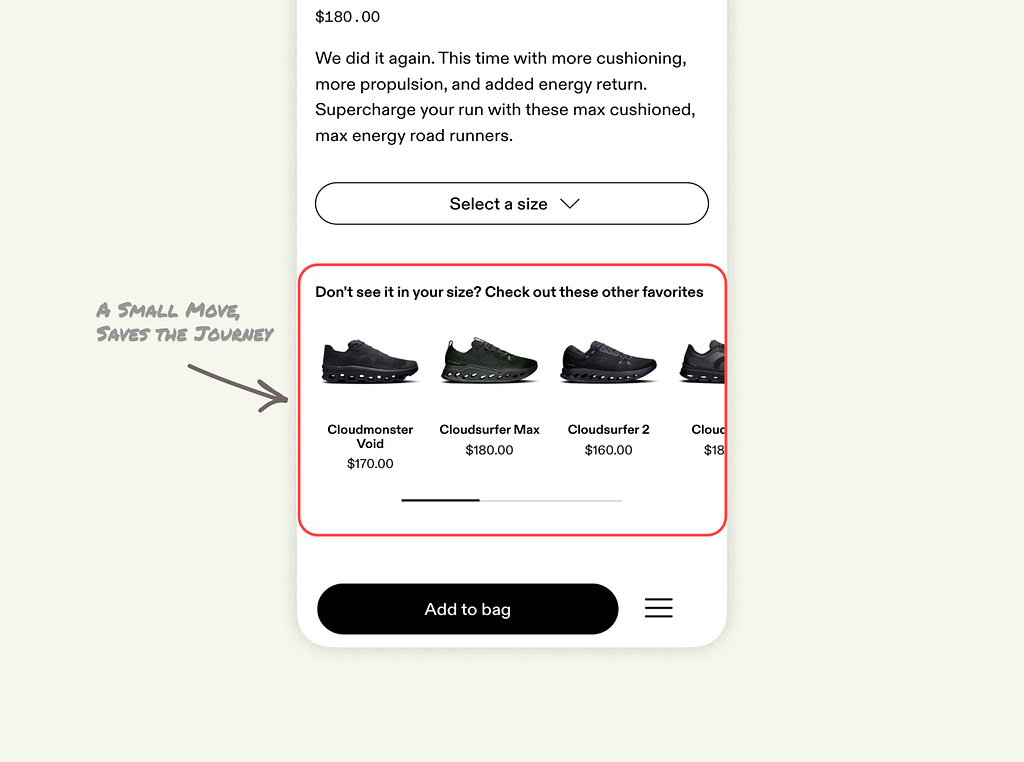
This copy is brilliant because it acknowledges the user’s problem immediately. It doesn’t pretend the shoe is in stock. It says, “We know your size is gone, but look at these instead.”
Why This UI Pattern Works
There are three layers to why this specific implementation works better than standard recommendations.
1. It preserves the momentum: By placing this module immediately below the size selector, it catches the user right before the “drop-off” point. They take the user’s disappointment and immediately channel it into a new discovery path. It keeps the user in “Active Buying Mode.”
2. It is Contextual (The “Smart” Design): I poked around the app to test this. If you look at a shoe where all sizes are fully stocked, this section doesn’t exist.
This is a crucial lesson for product designers. We often design static layouts: Header, Image, Description, Recommendations, Footer.
But On uses Contextual Design. The UI adapts based on the inventory data.
- Stock full? Focus on selling this shoe.
- Stock empty? Focus on selling a specific alternative.
The interface changes to serve the business goal (conversion) and the user goal (finding shoes).
3. The Algorithm is Empathetic: The recommendations weren’t random. They didn’t show me a hiking boot or a pair of socks. They showed me:
- Shoes that were currently in stock in my likely size.
- Shoes that were visually similar (dark colors/black).
- Shoes in the same performance category (max cushioning).
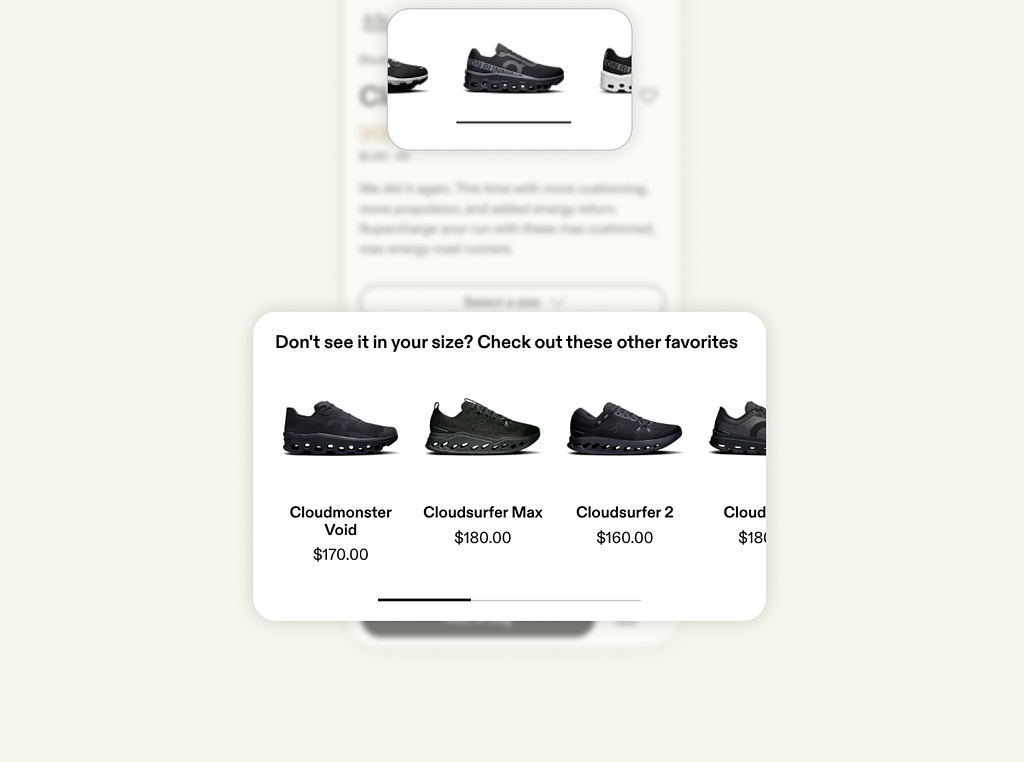
This builds trust. If they had shown me random items, I would have ignored them. Because they showed me relevant alternatives, I felt like the app “understood” what I was looking for.
The Takeaway for Designers
As designers, we spend weeks perfecting the “Happy Path”, the scenario where everything goes right. We design beautiful checkout flows and product pages, assuming the product is available.
But the “Unhappy Path”, errors, out-of-stock states, empty states, is where you actually prove your value.
The lesson from On is simple. Don’t treat an “Out of Stock” message as a period at the end of a sentence. Treat it like a comma.
Do not say: “Sorry, we are out. Come back later.” Say: “Sorry, we are out of this one, but here is something just as good that you can have right now.”
That is the difference between a dead end and a detour. And detours still get you to the destination.
Why Your “Out of Stock” State is Losing You Users was originally published in UX Planet on Medium, where people are continuing the conversation by highlighting and responding to this story.
المصدر: المصدر الأصلي
{“@context”:”https://schema.org”,”@type”:”NewsArticle”,”headline”:”Why Your “Out of Stock” State is Losing You Users”,”description”:”
How the On app keeps users in ‘active buying mode’ when inventory runs out
We have all been there.
You are browsing a store on your phone. You finally find the perfect pair of running shoes. The model looks great, the color is exactly what you wanted, and you are mentally already wearing them on your morning run.
You tap the “Select Size” button.
And that is where the excitement dies.
Your size is grayed out. Crossed out. Unavailable.
In 90% of e-commerce apps, this is where the user journey ends. The app might offer a “Notify Me” button, asking for your email to tell you when it might come back. But let’s be honest, the moment has passed. You close the app, and the sale is lost.
I recently experienced this on the On Running app, but instead of hitting a dead end, I found myself buying a completely different pair of shoes five minutes later.
Here is a breakdown of the subtle UX pattern they used to save the sale, and why it is a masterclass in contextual design.
The Problem with “Notify Me”
When a user lands on a product page, they are in a high-intent state. They are ready to buy now.
When we tell a user, “We don’t have this, but give us your email,” we are forcing them to switch from Active Buying Mode to Passive Waiting Mode. We are essentially telling them to stop shopping.
Most designers treat “Out of Stock” as a system status. On treats it as a design challenge.
The Pivot
I was looking at the Cloudmonster 2. My size was gone.
Usually, I would just swipe back to the home page or close the app. But as I scrolled just a few pixels down, I saw a section specifically designed for this exact moment of frustration.
It wasn’t a generic “You may also like” section.
It was titled: “Don’t see it in your size? Check out these other favorites.”
This copy is brilliant because it acknowledges the user’s problem immediately. It doesn’t pretend the shoe is in stock. It says, “We know your size is gone, but look at these instead.”
Why This UI Pattern Works
There are three layers to why this specific implementation works better than standard recommendations.
1. It preserves the momentum: By placing this module immediately below the size selector, it catches the user right before the “drop-off” point. They take the user’s disappointment and immediately channel it into a new discovery path. It keeps the user in “Active Buying Mode.”
2. It is Contextual (The “Smart” Design): I poked around the app to test this. If you look at a shoe where all sizes are fully stocked, this section doesn’t exist.
This is a crucial lesson for product designers. We often design static layouts: Header, Image, Description, Recommendations, Footer.
But On uses Contextual Design. The UI adapts based on the inventory data.
- Stock full? Focus on selling this shoe.
- Stock empty? Focus on selling a specific alternative.
The interface changes to serve the business goal (conversion) and the user goal (finding shoes).
3. The Algorithm is Empathetic: The recommendations weren’t random. They didn’t show me a hiking boot or a pair of socks. They showed me:
- Shoes that were currently in stock in my likely size.
- Shoes that were visually similar (dark colors/black).
- Shoes in the same performance category (max cushioning).
This builds trust. If they had shown me random items, I would have ignored them. Because they showed me relevant alternatives, I felt like the app “understood” what I was looking for.
The Takeaway for Designers
As designers, we spend weeks perfecting the “Happy Path”, the scenario where everything goes right. We design beautiful checkout flows and product pages, assuming the product is available.
But the “Unhappy Path”, errors, out-of-stock states, empty states, is where you actually prove your value.
The lesson from On is simple. Don’t treat an “Out of Stock” message as a period at the end of a sentence. Treat it like a comma.
Do not say: “Sorry, we are out. Come back later.” Say: “Sorry, we are out of this one, but here is something just as good that you can have right now.”
That is the difference between a dead end and a detour. And detours still get you to the destination.
Why Your “Out of Stock” State is Losing You Users was originally published in UX Planet on Medium, where people are continuing the conversation by highlighting and responding to this story.
“,”datePublished”:”2025-12-16 11:31:24″,”author”:{“@type”:”Organization”,”name”:”العربية”},”publisher”:{“@type”:”Organization”,”name”:”Newsly”,”url”:”http://wordpress-hr2d6.wasmer.app”},”image”:”https://cdn-images-1.medium.com/max/1024/1*uxU7GcYZP6A7LwMltnv32Q.png”}

Post Comment